EPFL Day 1: Interaction with the Environment
The first day was dedicated to understanding the fundamentals: what exactly is a mobile robot and how does it interact with the world Unlike industrial robots that are bolted down, mobile robots are designed to navigate and operate in dynamic environments.
It was an intense and incredible experience where I learned how to translate lines of code into physical action.
Key Concepts: The Control Loop
We learned that every autonomous robot follows a fundamental control cycle:
- Sense: Gathering data from the environment using sensors.
- Decide: Processing that data using a controller to determine the next action.
- Act: Executing the physical movement using actuators like motors.
To practice this, we used a Micro:bit board programmed with MicroPython, which allows for direct hardware manipulation.
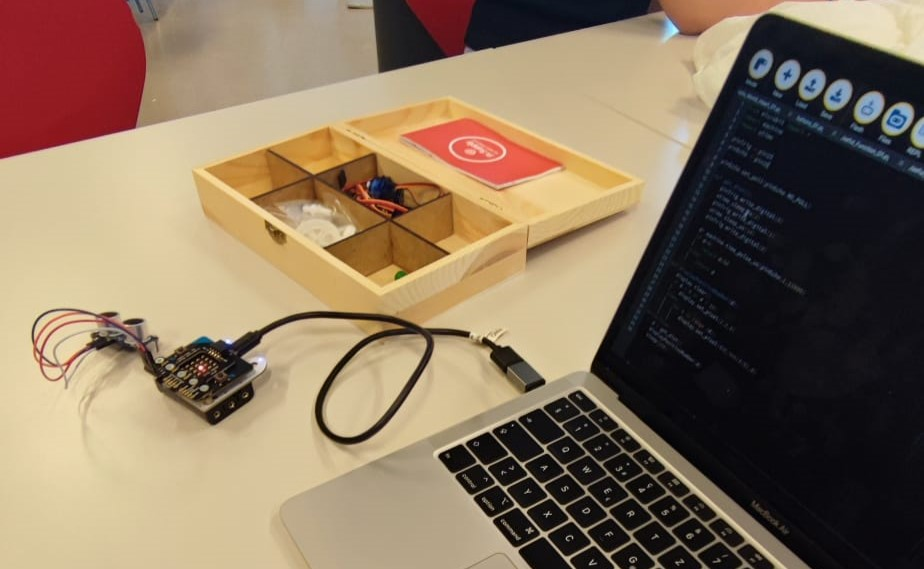
Hands-on Exercises
1. Analog Control: Potentiometer and Servo
This exercise focused on using an analog input to control a continuous mechanical part. By turning a potentiometer, we could dictate the precise angular position of a servo motor.
1
2
3
4
5
6
7
8
9
10
11
12
13
14
15
from microbit import *

# Set the period of PWM (Pulse Width Modulation) to 10ms for the servo
pin1.set_analog_period(10)

while True:
    # Read the analog voltage (0 to 1023)
    pot = pin0.read_analog()

    # Map the potentiometer value to a duty cycle suitable for the servo
    duty = int(50 + 200 * pot / 1023)

    # Send the position command
    pin1.write_analog(duty)
    sleep(100)
How it works: The code reads the analog voltage from the potentiometer and mathematically maps that 0-1023 value to a duty cycle range (50-250). This mapped value is sent via PWM to the servo, allowing for smooth, continuous movement based on physical input.
2. Measuring Distance with an Ultrasonic Sensor
To give our robot spatial awareness, we used an HC-SR04 ultrasonic distance sensor. This sensor works like bat echolocation: it sends out a sound pulse and measures how long it takes for the echo to return.
1
2
3
4
5
6
7
8
9
10
11
12
13
14
15
16
17
18
19
20
21
22
23
from microbit import *
import machine
import utime

pinTrig = pin15 # Trigger pin - sends the sound pulse
pinEcho = pin16 # Echo pin - receives the reflected sound

def get_dist():
    # Send a short 10us pulse to emit sound
    pinTrig.write_digital(0)
    utime.sleep_us(2)
    pinTrig.write_digital(1)
    utime.sleep_us(10)
    pinTrig.write_digital(0)

    # Measure the duration of the returning pulse in microseconds
    dt = machine.time_pulse_us(pinEcho, 1, 11600)

    if dt > 0:
        # Distance (cm) = (dt / 2) * 0.0343 (Speed of sound)
        return dt / 58.2
    else:
        return 200 # Default large distance if no echo
3. Visual Feedback with NeoPixels
Robots also need to communicate their state visually. We learned how to control individual NeoPixel LEDs. I programmed the Micro:bit’s physical buttons to trigger visual responses, changing the LEDs to magenta or yellow.
1
2
3
4
5
6
7
8
9
10
11
12
13
14
15
16
17
18
from microbit import *
import neopixel

# Create a NeoPixel object (connected to pin0, with 2 LEDs)
np = neopixel.NeoPixel(pin0, 2)

while True:
    if button_a.was_pressed():
        np[0] = (255, 0, 255) # Magenta
        np[1] = (255, 0, 255)
        np.show() # Update LEDs

    if button_b.was_pressed():
        np[0] = (255, 255, 0) # Yellow
        np[1] = (255, 255, 0)
        np.show()

    sleep(100)
This video is from the next day with our own robot, but we implemented this NeoLed code.